
Developers & release engineers
Ship multi-gigabyte artifacts to global collaborators without standing up a bespoke CDN for every drop. Per-torrent caps prevent CI machines from saturating uplinks during business hours.
Pair with
Desktop authority overview
A mature Windows torrent client for organized bulk downloading, disciplined bandwidth allocation, and transparent swarm visibility—presented here as an independent reference for readers evaluating safe torrenting software workflows.
Trust-oriented note: always prefer the publisher’s signed Windows build, verify checksums when published, and pair strong endpoint hygiene with responsible, lawful use. See integrity practices on this site.
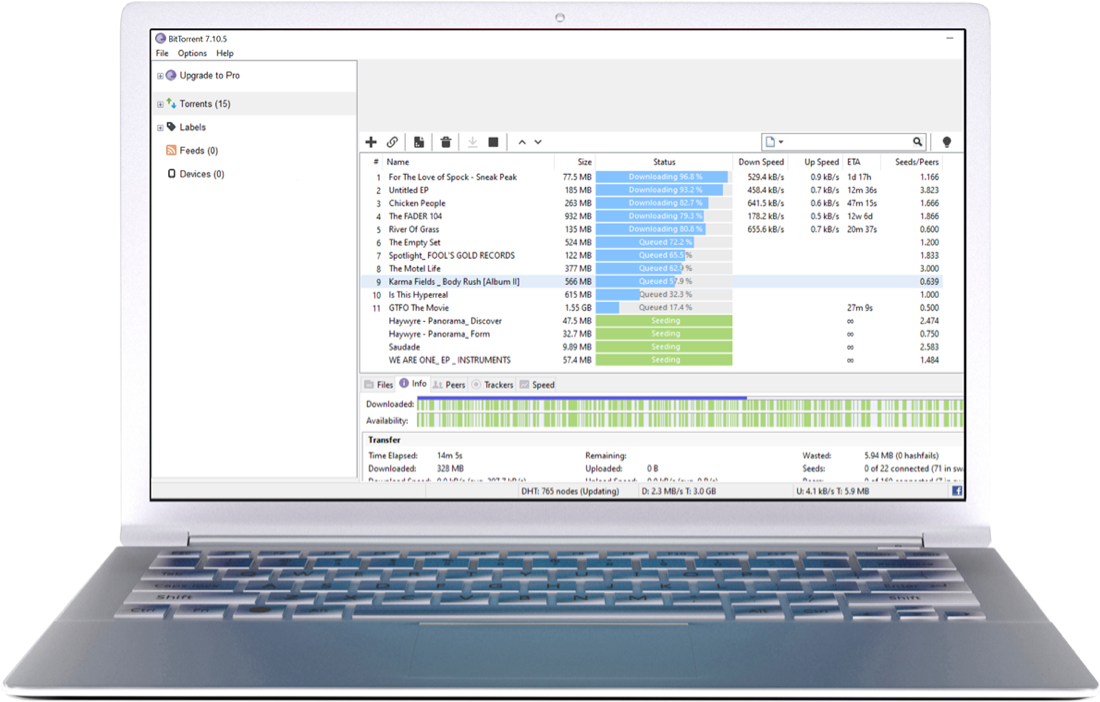
BitTorrent is both a widely deployed peer-to-peer file sharing protocol and a family of client applications. On Windows, the classic-style experience emphasizes a dense torrent table—names, sizes, live speeds, ETA, seeds/peers—and a lower detail pane for files, peers, trackers, and performance graphs. That design rewards power users who want predictable bulk throughput without surrendering observability.
This page series on bittorrent.pro explains how those controls map to everyday outcomes: fewer surprise bandwidth spikes, clearer swarm health signals, and safer handling of metadata and magnets. Editorial sources include the official BitTorrent Classic positioning and third-party mirrors such as Softonic’s program listing for cross-checking version labels and community sentiment.
External references: BitTorrent Classic product page · Softonic BitTorrent for Windows
These cards summarize the capabilities most readers associate with a credible Windows torrent client. Each card links to a deeper section on the dedicated features page.
BitTorrent Classic is a bulk torrent downloader that helps you to download dozens of files simultaneously.
Full feature page →Downloading more than one torrent? Allocate more bandwidth to a specific torrent to download it faster.
Full feature page →Set download/upload speed limits to free up network resources for your other internet tasks.
Full feature page →Use the remote feature to add torrents from BitTorrent Android or through a browser on any device.
Full feature page →Torrent clients remain legitimate distribution tools for large, legal payloads—game patches, open datasets, Linux images, and internal enterprise payloads mirrored with permission. The workflows below are representative of how disciplined teams actually use a bulk torrent downloader responsibly.
Ship multi-gigabyte artifacts to global collaborators without standing up a bespoke CDN for every drop. Per-torrent caps prevent CI machines from saturating uplinks during business hours.
Pair with
Stage approved ISOs and driver packs inside controlled VLANs. Scheduler windows align heavy seeding with maintenance nights while keeping daytime latency predictable for staff VPNs.
Pair with
Balance simultaneous creative sync tools, cloud storage, and torrent activity using hard caps, per-torrent priority, and tracker visibility—treating the client as a measurable network citizen, not a black box.
Pair with
This is a qualitative, category-level view—not a synthetic benchmark. Use it to orient purchasing and governance conversations; validate throughput with your own NIC, disk, and tracker mix.
| Client family | Strengths | Trade-offs | Typical fit |
|---|---|---|---|
| BitTorrent / µTorrent lineage | Mature UI idioms, broad Windows reach, familiar columns for speeds and swarm counts. | Feature cadence and bundle policies vary by edition—read installers carefully. | Readers who want a mainstream, desktop-first workflow with granular caps. |
| qBittorrent | Open-source visibility, integrated search modules (where enabled), cross-platform parity. | UI density differs; enterprise packaging may lag distro-specific builds. | Teams that mandate auditable GPLv2 tooling. |
| Deluge | Thin client + daemon model suits headless boxes. | Plugin ecosystem quality varies; Windows polish is uneven vs. top commercial UIs. | Homelab seedboxes and scripted workflows. |
| Transmission | Minimal defaults, respected on macOS/Linux. | Windows builds exist but are less central to the brand story. | Unix-forward environments prioritizing simplicity. |
Editorial independence: bittorrent.pro does not claim benchmark superiority; compare clients against your compliance and telemetry requirements.
Trust for a torrent client is less about marketing superlatives and more about repeatable supply-chain hygiene: signed installers, verifiable hashes where published, conservative update channels, and clear disclosure when optional offers appear. Third-party aggregators such as Softonic have documented VirusTotal-style scanning for the official BitTorrent payload—useful as a secondary signal, not a replacement for publisher verification.
Summaries of every anonymized review from your Softonic-style screenshot set (five in the capture, plus the June 2018 listing). Each row is 5★ for display consistency; text is condensed, not quoted verbatim.
Auto-scroll · hover to pause
★★★★★
Movies & loyalty. Praises downloading films; says they have used it happily for a long time.
★★★★★
Learning curve & size. Needed family help to learn it; uses BitTorrent when other movie sources fail; stresses torrent files can be very large.
★★★★★
Speed & clarity. Calls it the fastest option for them; likes how clearly progress shows; long-term downloader.
★★★★★
Strong recommendation. Describes an excellent overall experience and encourages others to choose BitTorrent.
★★★★★
Search & trust. Finds searching easy, content feels reliable, and calls the app genuinely good.
★★★★★
Cross-platform habit. Loves downloading through the clients on PC and also uses Mac and Android; wishes newer APK builds were easier to find.
★★★★★
Movies & loyalty. Praises downloading films; says they have used it happily for a long time.
★★★★★
Learning curve & size. Needed family help to learn it; uses BitTorrent when other movie sources fail; stresses torrent files can be very large.
★★★★★
Speed & clarity. Calls it the fastest option for them; likes how clearly progress shows; long-term downloader.
★★★★★
Strong recommendation. Describes an excellent overall experience and encourages others to choose BitTorrent.
★★★★★
Search & trust. Finds searching easy, content feels reliable, and calls the app genuinely good.
★★★★★
Cross-platform habit. Loves downloading through the clients on PC and also uses Mac and Android; wishes newer APK builds were easier to find.
Quick answers for the most common questions; expand each row. The full FAQ page now covers magnets, trackers, port forwarding, ratios, RSS, disk space, and more.
BitTorrent is a peer-to-peer communications protocol for moving large files efficiently by exchanging small pieces among many participants. A desktop client schedules those pieces, verifies hashes, and re-assembles the payload while exposing swarm health metrics.
You can download and seed authorized torrents, manage simultaneous jobs, throttle bandwidth, and automate recurring feeds—provided you respect copyright and local law.
Seeding means continuing to upload pieces after your download completes, strengthening swarm resilience for others who join later.
A .torrent file is metadata you open in the client. A magnet link carries the same kind of info in a URL so the client can resolve the swarm without a separate file—useful when sites only publish magnets.
Often firewall or NAT issues, dead trackers, or slow magnet metadata. Confirm Windows Firewall allows the client, try another torrent to test, then see Guides → magnets.
Not always, but inbound ports usually help you accept more peers and improve speeds. UPnP or manual forwarding on your router are the typical fixes.
The protocol is legal; each transfer depends on whether you have rights to the content. Use only authorized sources and follow local law.
Jump to the download desk for official pointers, checksum expectations, and antivirus context before you run any new build.